Designing and deploying a full monitoring stack
How I designed and deployed a full monitoring stack in production, from scratch.
The Problem
- no central log visibility - logs scattered all around the place
- no log retention - some critical logs were kept for half a day only
- no log correlation - no way to correlate endpoints, servers and networks logs
- very limited metrics - some business critical metrics not available
- unreliable alerting system - critical infrastructure alerts sitting in unread folders
Taking a step back, that’s three problems in one : logs, metrics and alerting.
Why does this matter ?
Having to use 3+ different platforms to browse logs when troubleshooting is not efficient. You loose time tweaking each platform query, instead of focusing on understanding the correlation and fix it.
Having logs from multiple platforms should help you troubleshoot, not slow you down.
Also, having critical logs kept only half a day is not good for business. This is a dangerous blind zone.
You need pertinent metrics to help you troubleshoot and keep an eye on performance and availability.
If every alert is critical, then nothing is critical, and all alerts sit in a big unread email folder (we’ve all been there). Thing is, there is one critical alert in the middle of 100s of minor ones.
What I built
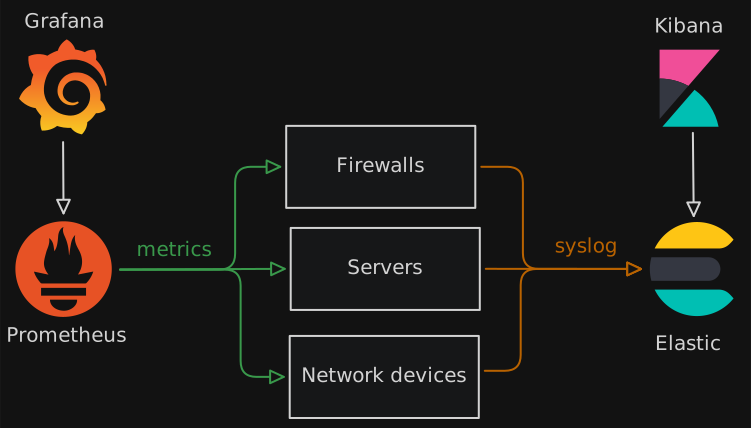
I took the initiative to design and deploy a full monitoring solution. add diagram
It goes in 3 parts.
Part 1 - Centralized log aggregation
- Elastic - ingesting and storing logs
- Kibana - central log browsing and alerting
- OpenCTI - enriching logs with external Cyber Threat Intelligence feeds
Part 2 - Infrastructure monitoring
- Prometheus - pulling metrics from exporters
- Blackbox exporter - more detailed network metrics
- Grafana - dashboards and alerting
Part 3 - Alerting
Creating critical alerts from scratch, based on past incidents. Deciding who needs to receive this alert, instead of sending to a mailing list.
How I built it
More technical details for the curious.
Elastic
Using native Elastic Agent to ingest logs from different sources (windows, linux, firewalls, EDR, network devices…). I did not use Logstash which uses way more RAM and is more suited for complex scenarios, this one was pretty straightforward.
I made the effort to enforce the ECS (Elastic Common Scheme) to make sure correlation is possible and useful. The goal is to have unique a unique field name accross multiple vendors (exemple: src_ip field instead of source_ip, src…)
Kibana
Alerting to ??
OpenCTI
I always wanted to try this Open Source Cyber Threat Intelligence Platform. This was the perfect use case.
The goal was to add context to logs. For exemple, if we see allowed traffic to a known Command & Control IP, we want to be aware fast (ideally blocking it, but that’s another story)
If a Command&Control if an IP found in an allow firewall rule is in the list of known Command and Control servers, we want to be aware quickly.
There is a native connector with Elastic, which I used to give OpenCTI access to logs.
I configured public feeds like AbuseIPDB, MITRE ATT&CK, AlienVault OTX to get intelligence data. This is done via OpenCTI native integrations.
Improvement ideas:
- feed CSV file with IOCs found in past incidents to OpenCTI, to limit chance to get breached the same way again
- build active response from there, like connecting to firewalls to automatically block confirmed high risk attacks (simpler said than done, require quite more work)
- add specific RSS feeds related to the business category and to the devices present in the company
Prometheus & exporters
Installed prometheus exporter on linux and windows. Used specific exporter for others editors.
Developed a custom prometheus exporter module to fetch a specific information on firewall, that is not usually useful but critical for business in this case.
Deployed Blackbox exporter to get deeper network monitoring metrics: more detailed latency, SSL certificate status, DNS status for internal domains…
Grafana
I love Grafana. Plugged the Prometheus data source, added some community made Prometheus dashboards, and then built a few custom ones for the most critical business metrics.
Then added alerting, based on most critical events and past incidents. Alerts went to a more pleasant and reactive channels than email.
The hard parts
Few pain points:
-
Elastic Common Scheme - I always struggle a bit with this one. I became comfortable doing it in Logstash, but as I used the new native Elastic integration this time, I needed to use the Ingest Pipeline and the syntax is a bit different.
-
Custom Prometheus Exporter - the metric in question was critical for operations, so it wasn’t optionnal. I didn’t want this single thing became the reason we dropped Prometheus, because it had real added value here. I love coding, only obstacle here is that the exporter was written in Go. Soooo, I ended up learning Go and making the exporter. It worked perfectly.
-
Some connectors with specific editors took more time to get to work properly, but eventually we got it working the way we wanted.
My experience with those tools in my Homelab helped me to paint a more accurate picture of what was needed and make more relevant choices along the way, as well as sped up the design and deployment process, cause I’ve already done it :)
The end result
- ALL logs aggregated, retained and browsable in ONE place
- ALL infrastructure metrics polled by Prometheus, browsable in ONE place
- Relevant and efficient alerting based on business risks
What it actually Changed
Visibility. We had visibility.
We could now easily dig down into both the logs and metrics for a specific time, see the related devices, and what has gone wrong.
It helped us with security incidents as well, seeing corresponding traffic logs.
No more alerte fatigue too. Instead of daily alerts mails, we had a specific channels with only importants alerts.
What I learned
I learned a few things
- Skills learned late at night in my homelab are actually very benificial in a business production environment
- I like to build stuff from scratch with a clear vision of where I am going
- I enjoy dealing with metrics and monitoring a lot